Top Local SEO Software for Service-Area Businesses | Local Rankings AI
Top Local SEO Software for Service-Area Businesses: Street-Level Ranking Explained
Discover why service-area businesses need street-level ranking tracking to improve local SEO visibility. Learn how geo-grid heatmaps reveal ranking gaps, optimize coverage zones, and drive growth.
If your business serves customers across a geographic area rather than a fixed storefront, your local SEO challenges are fundamentally different - and most software isn't built for them.
Service-area businesses have a visibility problem that most local SEO advice doesn't address directly. A plumber, a landscaper, a mobile dog groomer, an HVAC company - none of these businesses pull customers from a single address. Their revenue depends on being found across an entire region, often spanning dozens of neighborhoods with completely different competitive landscapes.
The standard advice - optimize your Google Business Profile, get more reviews, build citations - is correct but incomplete. Because none of it answers the question that actually drives revenue for a service-area business: where exactly across my coverage zone am I visible, and where am I not?
That question requires a specific kind of software to answer. This guide explains what street-level ranking means, why it matters more for service-area businesses than any other business type, and what to look for in top local SEO software built to handle it.
Top Local SEO Software Built for Service-Area Businesses That Need Street-Level Visibility
Why Service-Area Businesses Have a Different Ranking Problem
A restaurant or retail store has one address. Every customer searching nearby is within roughly the same distance. The ranking challenge is relatively straightforward — appear when someone nearby searches for what you offer.
A service-area business doesn't work this way. The customer could be anywhere across a 20, 30, or 50-kilometer radius. And because Google's algorithm weights proximity heavily — adjusting results based on where the searcher is standing at the moment they search — your ranking is not one number. It's hundreds of different numbers, shifting constantly depending on which corner of your service area the search is coming from.
This creates a specific problem: you could be dominating rankings near your home base while being completely invisible in the neighborhoods that represent your highest-value work. You'd never know, because a single ranking check from your own address doesn't show it.
Street-level ranking tracking exists to solve exactly this — giving service-area businesses a real map of their visibility rather than a single misleading data point.
What Street-Level Ranking Actually Means
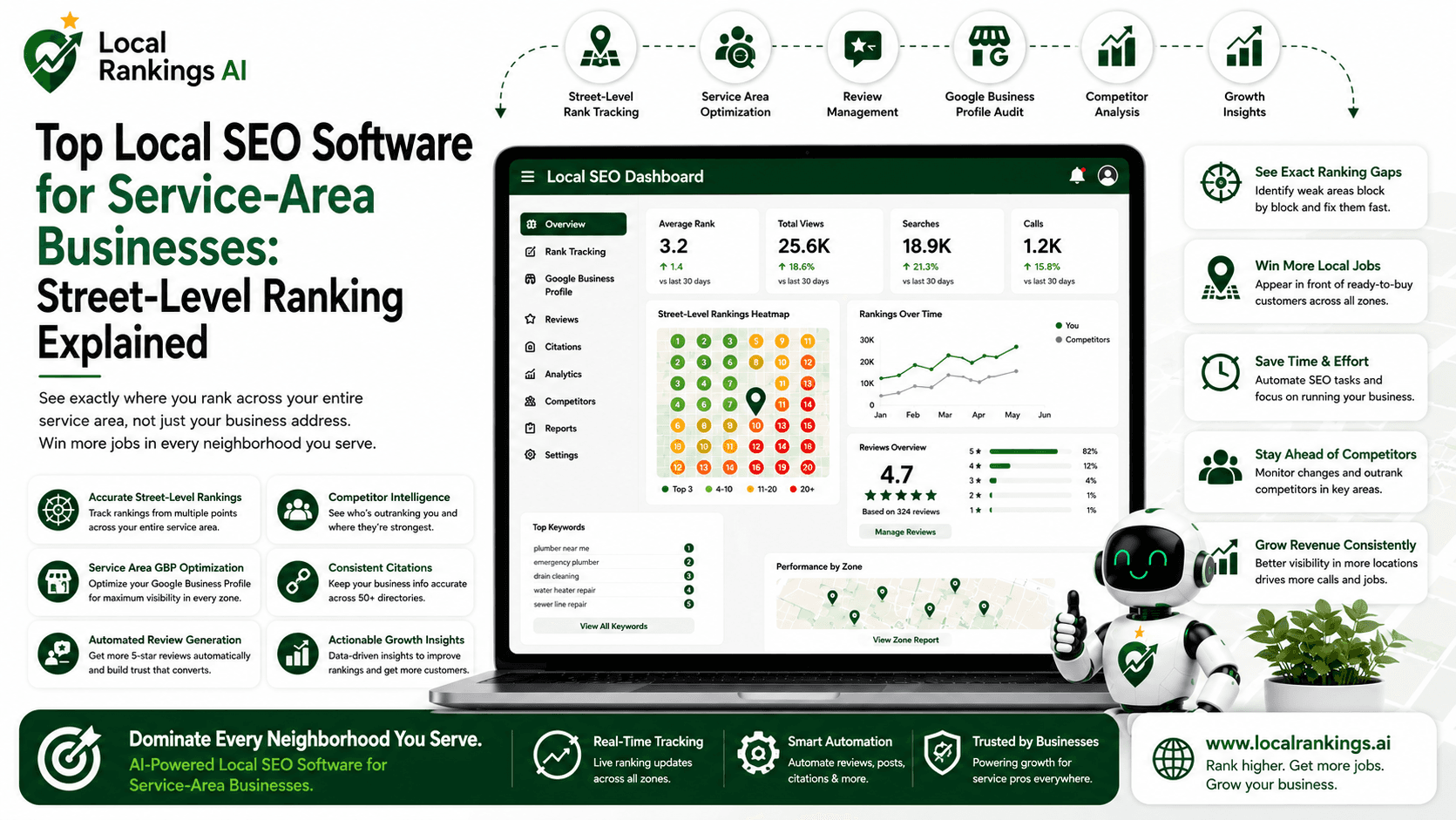
Street-level ranking — sometimes called geo-grid tracking — works by measuring your search position from multiple geographic points across your service area simultaneously.
Instead of checking where you rank from one location, the software overlays a grid across your coverage zone and checks your ranking from every point on that grid. A standard 7×7 configuration gives you 49 data points per keyword. A larger grid gives you more.
The result is a heatmap — a visual representation of your local search visibility that shows exactly where you appear prominently, where your rankings drop off, and where you're effectively invisible to potential customers searching from those areas.
For a service-area business, this changes everything about how you approach local SEO. You stop asking "how do we improve our ranking" and start asking "which specific zones are underperforming, and why?" — which leads to targeted actions with measurable geographic outcomes rather than general optimizations that may or may not move the right needle.
What Top Local SEO Software Must Do for Service-Area Businesses
Not all local SEO platforms are built with service-area businesses in mind. Many are designed primarily for brick-and-mortar locations with a single address and a relatively contained customer radius. Here's what separates software genuinely built for service-area use cases:
Geo-Grid Rank Tracking Across the Full Coverage Zone
This is the non-negotiable foundation. If a platform doesn't track rankings from multiple geographic points across your service area — not just from your registered business address — it cannot give you an accurate picture of your local visibility.
When evaluating any platform, ask specifically: how many tracking points does it support per keyword, can I define my own service area boundaries, and how frequently does it refresh the data? Weekly snapshots are the minimum; more frequent updates matter for competitive markets where rankings shift quickly.
Checking your rankings across your full service area - not just your home base - is the starting point for any serious local SEO strategy for a service-area business.
Service-Area-Specific Google Business Profile Management
Google Business Profiles for service-area businesses work differently than profiles for storefront businesses. You hide your physical address, define coverage zones instead, and your ranking signals are weighted differently as a result.
Top local SEO software accounts for this. It audits your GBP against service-area-specific best practices — not the generic checklist designed for a restaurant or retail store. Missing service areas, incorrectly configured coverage zones, and category mismatches all suppress visibility in ways that standard GBP advice won't catch.
Running a full audit of your business profile surfaces these gaps specifically and prioritizes them by the ranking impact they're having on your coverage zone performance.
Zone-by-Zone Performance Reporting
Generic reporting that averages your performance across your entire service area hides the data that actually matters. A service-area business needs to know which zones are performing, which are declining, and which have never gained traction — broken down geographically, not averaged into a single number.
Look for platforms where reporting can be filtered or segmented by geographic zone. This is what makes it possible to have a genuine strategic conversation about where to invest optimization effort next — rather than applying the same fixes uniformly across an area where the problems are completely different in different locations.
Seeing what zone-level reporting looks like in practice before committing to a platform tells you a lot about whether the software was built for businesses like yours.
Multi-Platform Presence Across All Local Directories
For service-area businesses, citation consistency is particularly important because your physical address isn't visible — which means the other signals Google uses to verify your legitimacy and coverage area carry more weight.
Inconsistent NAP data across directories, incorrect service area definitions on Apple Maps or Bing, missing or outdated listings on secondary platforms — these create trust gaps that suppress your rankings even when your GBP looks solid. Top local SEO software manages these automatically across all the platforms your customers are searching on — not just Google.
AI Search Readiness
An increasing number of local searches for service-area businesses now happen through AI-powered answer engines. "Who's the best electrician in [neighborhood]" typed into an AI assistant returns answers based on structured, consistent, authoritative data — not necessarily the same signals that drive Google Maps rankings.
Service-area businesses that have clean, consistent, well-structured presence data across platforms are significantly more likely to appear in these AI-generated answers than those that don't. This is no longer a future consideration — it's a current one, and it's a capability gap in most platforms that haven't been built with AI search in mind. Schedule Demo
The Street-Level Ranking Process: How It Works in Practice
Understanding the mechanics helps you evaluate whether a platform's approach is genuinely useful or just visually impressive.
Step 1 — Define your service area. The software maps a grid across the geographic zone you want to track. You define the center point, the radius, and the grid density. A tighter grid gives you more granular data; a wider grid covers more territory per check.
Step 2 — Select your target keywords. For a service-area business, this typically means your core service categories plus location modifiers — "emergency plumber," "roof repair," "landscaping service" — the phrases your customers actually use when they need what you offer.
Step 3 — Run the ranking check. The software checks your position for each keyword from every point on the grid simultaneously. This produces the heatmap — a color-coded visual showing where you rank prominently (typically green), where you're mid-pack (yellow), and where you're effectively invisible (red).
Step 4 — Identify the priority zones. The heatmap immediately surfaces the geographic areas where your visibility is weakest. For most service-area businesses, the drop-off pattern is consistent: strong near the home base, declining at distance, with specific zones showing unexpected weakness that often traces back to a single fixable issue.
Step 5 — Act on the data. The ranking check is only valuable if it leads to action. The best platforms connect the heatmap directly to specific recommendations — which GBP elements to fix, which citations to clean up, which zones need targeted content or review concentration.
What Local Rankings AI Does Differently for Service-Area Businesses
Most local SEO platforms were built around the storefront model and adapted — imperfectly — for service-area use cases. Local Rankings AI was built from the start around the reality that local search visibility is geographic, not uniform, and that a single ranking number is structurally inadequate for businesses operating across a service zone.
The geo-rank heatmap is the foundation of the platform — not a feature added on top of a keyword tracker. Every other capability builds from it: GBP optimization tied to zone-specific performance, review automation that concentrates trust signals where they matter most, citation management that reinforces service-area legitimacy across every platform Google uses to verify your presence.
For service-area businesses specifically, this means the data you get is actionable by location - not averaged into a number that obscures where the real problems are.
How to Evaluate Any Platform Before Committing
Use this checklist when comparing top local SEO software options:
Does it track rankings from multiple geographic points, or just one? Single-point tracking is inadequate for service-area businesses.
Can you define your own service area boundaries? Preset grids that don't match your actual coverage zone produce irrelevant data.
Does the GBP audit account for service-area-specific settings? Generic audits miss the issues that matter most for businesses without a visible address.
Does reporting break down by geographic zone? Averaged metrics hide the information you actually need to make decisions.
Does the platform address AI search readiness? If not, you're optimizing for a portion of local search while ignoring a growing segment.
Is the heatmap connected to recommendations, or just a visual? Data without direction doesn't move rankings.
Start with a free ranking check across your service area — it immediately shows you whether any platform's data matches the reality of your local visibility before you spend anything.
The Bottom Line for Service-Area Businesses
You cannot manage what you cannot measure - and for a service-area business, measuring local SEO means measuring it geographically, not averaging it into a single number that hides where the real problems are.
Street-level ranking tracking is not a premium feature for large enterprises. It's a baseline requirement for any service-area business serious about understanding and improving its local search visibility. The businesses pulling ahead in competitive local markets right now are the ones who know exactly which zones they're winning, which they're losing, and what's driving the difference.
See your street-level rankings for free - across your full service area, not just your address. It takes under 60 seconds and immediately shows you where you stand.